Watch the film "All because of Hitch" on Apple TV
THIS APP RUNS AT THE MOMENT ONLY IN USA AND CANADA.
Below Information how to install the "VIMooZ Cinema" App on Apple TV or Apple TV App to watch our film.
To watch on on Roku and Amazon Fire TV, please search "SSE TV" app. If you need help with this, click here.
If you do not have one of these platforms, you can rent our film via Vimeo on Demand. If you need help with Vimeo, click here.
You can rent the film for 48 hours. It has a running time of 1 hour and 38 minutes and is in English. There are bonus films (eg. making-of) available as part of the film rent and a trailer to see what you can expect. Copying, downloading, filming from screen, and distributing the film or part of it is prohibited. © www.scottiehitchcock.com / Michael Magee Productions GmbH
Please be aware that there is a difference between Apple TV, Apple TV+ and Apple TV App - the VIMooZ Cinema App runs on Apple TV and Apple TV App, but NOT on Apple TV+
Watch on Apple TV
- Open the App Store app
- Search or browse for the app “VIMooZ Cinema” you want to download
- Select the Get button for a free app
- If the app has an Open button, it’s already installed
- To access your movies, log in to the VIMooZ Cinema app using the same username and login as the website.
and you can find the film on the VIMooZ Website


FOR THE BEST VIEWING EXPERIENCE
- Ensure you watch the film somewhere with a fast, stable internet connection.
- Please watch the film on a large screen or project it onto a screen/ white wall with a good audio/sound system.
- Watch the film in full-screen mode if you are watching it on a computer (the full-screen button is the icon at the bottom right with the four arrows pointing to all four corners).
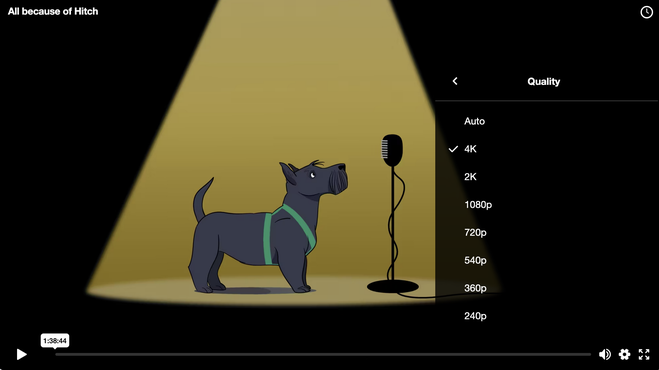
- Before starting, ensure that the resolution (quality) is at least 1080p and change it if necessary using the cog icon (see screen shot below). If you have a fast internet connection, you can increase the resolution to 2K or 4K, but there should be no interruptions; otherwise, select a lower resolution.
- Watch the title roll :-) The film ends when the copyright appears (the credits are also part of the film).
AFTER WATCHING THE FILM
We would love to hear your feedback. Please share this websites with your friends :-)
If you would like to suggest our film for your commercial VoD platform - in the case of Netflix, you can recommend films without having an account (Netflix, Disney+, etc.), that would be great.
We also welcome contact from distributors who would like to bring the film to cinemas (in this case, we can suspend the video-on-demand offer in the respective region for this time).
If you wish to screen this film in your local cinema or in an event facility, eg. for a club event, please contact us.
Don't forget to discover the rest of this website, eg. what to consider before getting a dog or how to train dogs successfully with fun and visit our merchandise shop :-)
Here you can see the trailer:
